


Page 121 - Demo
P. 121
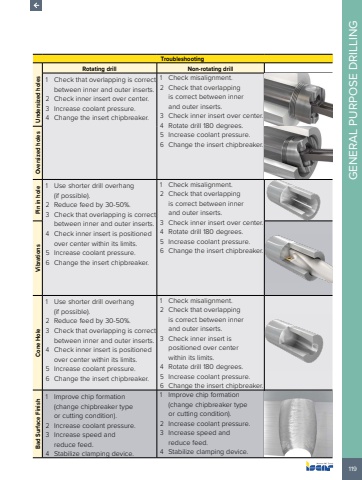
119GENERAL PURPOSE DRILLINGTroubleshootingRotating drill Non-rotating drillUndersized holes1 Check that overlapping is correct between inner and outer inserts.2 Check inner insert over center. 3 Increase coolant pressure. 4 Change the insert chipbreaker.1 Check misalignment. 2 Check that overlapping is correct between inner and outer inserts.3 Check inner insert over center. 4 Rotate drill 180 degrees. 5 Increase coolant pressure. 6 Change the insert chipbreaker. Oversized holes Pin in hole1 Use shorter drill overhang (if possible).2 Reduce feed by 30-50%. 3 Check that overlapping is correct between inner and outer inserts.4 Check inner insert is positioned over center within its limits.5 Increase coolant pressure. 6 Change the insert chipbreaker.1 Check misalignment. 2 Check that overlapping is correct between inner and outer inserts.3 Check inner insert over center. 4 Rotate drill 180 degrees. 5 Increase coolant pressure. 6 Change the insert chipbreaker. Vibrations Cone Hole 1 Use shorter drill overhang (if possible).2 Reduce feed by 30-50%. 3 Check that overlapping is correct between inner and outer inserts.4 Check inner insert is positioned over center within its limits.5 Increase coolant pressure. 6 Change the insert chipbreaker.1 Check misalignment. 2 Check that overlapping is correct between inner and outer inserts.3 Check inner insert is positioned over center within its limits.4 Rotate drill 180 degrees. 5 Increase coolant pressure. 6 Change the insert chipbreaker.Bad Surface Finish1 Improve chip formation (change chipbreaker type or cutting condition).2 Increase coolant pressure. 3 Increase speed and reduce feed.4 Stabilize clamping device.1 Improve chip formation (change chipbreaker type or cutting condition).2 Increase coolant pressure. 3 Increase speed and reduce feed.4 Stabilize clamping device.


